Print Guide · OEM Buyer Resource
By TopUmbrella Editorial · May 2026 · Custom Umbrella Printing Artwork Preparation
Send us the right files from the start — and your order moves faster, looks better, and costs less to revise.
Step 1 — Send a Vector File (Best Option)
Vector files are built from mathematical lines and shapes — they scale to any size without losing sharpness or detail. If a designer created your logo, ask them for the original source file. We accept the following formats:
Encapsulated PostScript
.eps
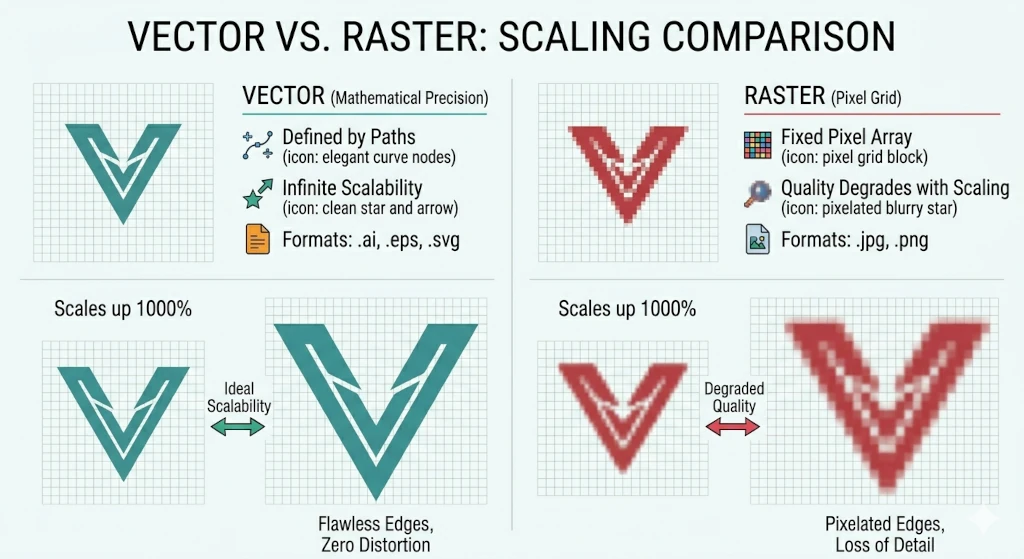
Original scale up Sharp edges Vector (.ai / .eps / .svg) Stays crisp at any size Original scale up Pixelated Raster image (low DPI) Blurs when enlarged
The same logo scaled up — vector stays sharp, low-resolution raster becomes pixelated.
Free templates available
We provide blank .ai template files for all umbrella sizes — already set to the correct panel dimensions. Place your design onto the template and send it back. Contact us to request the template for your umbrella model.
Step 2 — If You Only Have an Image File: Resolution Requirements
We can work with raster images, but they must meet minimum size requirements at the actual print dimensions. A standard umbrella panel is approximately 60 × 55 cm.
| Print Method |
Min. Resolution |
Min. Pixel Size (single panel) |
| Heat Transfer / Digital Print |
150 DPI |
3,500 × 3,500 px |
| Sublimation |
150 DPI |
3,500 × 3,500 px |
| Screen Print |
300 DPI |
7,000 × 7,000 px |
Important: DPI must be measured at the actual print size, not at a reduced size. Artificially upscaling a low-resolution image in Photoshop does not improve print quality — the result will still appear blurry.
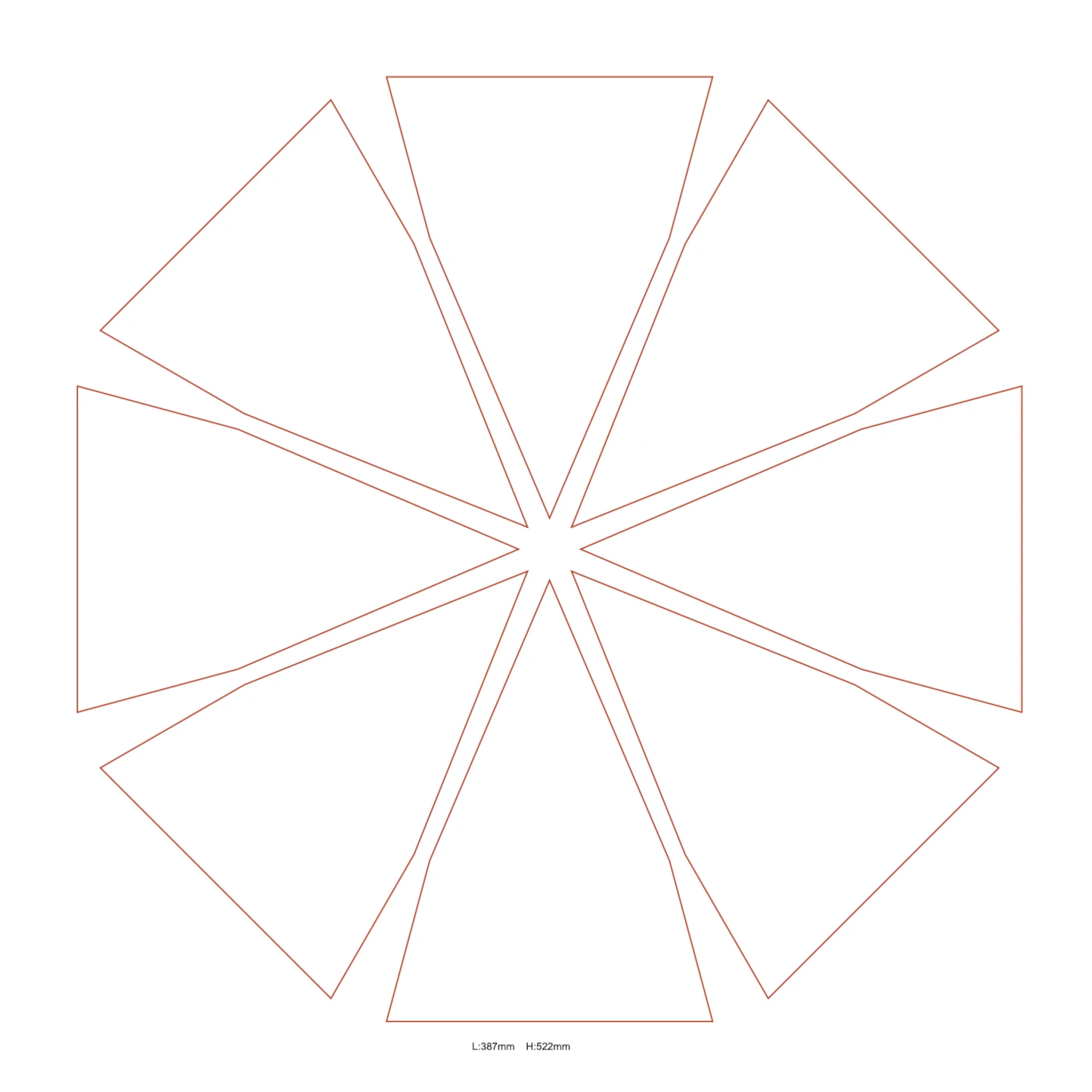
full canopy width~55 cm~60 cm / panelPlace design hereTip (top)8 panelsBlank .ai template
Our blank .ai template shows each panel at the correct scale — just drop in your design and send it back.
Common Artwork Problems to Avoid
These are the four most common file issues we see — all of them delay production and require an additional revision round before we can proceed.
Screenshots or web images — typically 72 DPI, far below the minimum for print. Cannot be used as-is.
Logo saved as JPEG — compression damages fine edges and text. Use PNG with transparent background instead, or better yet a vector file.
RGB color mode — always submit artwork in CMYK for accurate color reproduction in print.
Fonts not outlined — if submitting a vector file, convert all text to outlines to prevent font substitution during printing.
Pre-Send Checklist
Run through this list before submitting your files. If every item is checked, your artwork is ready for production.
Vector file (.ai / .eps / .svg / .pdf)
Or raster: 150–300 DPI at actual print size
Min. 3,500 px (7,000 px for screen print)
Color mode: CMYK (not RGB)
Logo with transparent background
All fonts outlined (vector files)
File named with company + order reference
Design fits within panel boundaries
Not Sure If Your File Is Ready?
Send us your artwork and we'll review it before production begins — no charge. We'll also send you the blank .ai template for your umbrella model.
Send Your Artwork →
Frequently Asked Questions
What is the best file format to send for custom umbrella printing?
A vector file is always the best option — .ai, .eps, .svg, or a vector-based .pdf. Vector files scale to any size without losing quality, and they are the standard for professional print production. If you only have a raster image, it must be at least 150 DPI at actual print size (300 DPI for screen print). Contact us to request a blank .ai template for your umbrella model.
Why does color mode matter — what is the difference between RGB and CMYK?
RGB is a screen color model — it is how monitors display color using light. CMYK is a print color model — it is how physical ink is mixed on a substrate. If you submit RGB artwork, the colors will be converted to CMYK during prepress, and the result can shift noticeably — particularly with bright blues, oranges, and neon tones. Submitting your file in CMYK from the start gives you accurate control over what the printed product looks like.
Can I just upscale a low-resolution image in Photoshop before sending?
No. Upscaling in Photoshop (or any other software) interpolates new pixels based on the existing data, but it does not add real detail that was not in the original image. The result will appear blurry when printed at large format. If you do not have a high-resolution file, ask your designer for the original source, or contact us — we can advise on the best path forward for your specific file.
Do I need to outline my fonts before sending a vector file?
Yes. When a vector file contains live text (fonts that have not been converted to outlines), it requires the same font to be installed on the production system. If the font is not available, a substitution will occur and your text may render incorrectly. Converting text to outlines in Illustrator (Type → Create Outlines) converts each character to a fixed vector shape, eliminating this risk entirely. Always outline all text before submitting.
How do I get a blank template for my umbrella model?
Contact us via the Contact Us page and specify the umbrella model you are ordering — or the canopy diameter and panel count if you are still in the evaluation stage. We will send you a blank .ai template file with panels already set to the correct dimensions. The template is free and takes less than a minute to set up for your design.

 Original scale up Sharp edges Vector (.ai / .eps / .svg) Stays crisp at any size Original scale up Pixelated Raster image (low DPI) Blurs when enlarged
 full canopy width~55 cm~60 cm / panelPlace design hereTip (top)8 panelsBlank .ai template